
Marketing Automation for Dental Clinics: How to Turn More Leads Into Booked Patients
Marketing automation for dental clinics is the layer most practices are missing between the money they spend generating enquiries and the patients who actually sit in the chair. This guide covers what it is, what a dental CRM does, which workflows are worth building, what should stay human, and what to measure.

Moaz Arshad
• 20 min read
Dental practices spend real money generating enquiries. A website, local SEO, Google Ads, Meta Ads, social media, the phone line, referrals from existing patients. All of it produces the same thing: a person who has raised their hand and is now waiting for a response.
Generating that enquiry is the beginning of the work, not the end of it. The conversion happens afterwards, in the hours and days after the form is submitted or the call rings out. That is the part almost nobody has built a system for.
Without a connected system, the pattern is predictable. New leads wait hours for a reply and call the next practice in the meantime. Missed calls disappear into a voicemail box nobody empties. Follow-up stops after one attempt because the front desk is checking in patients. No-shows are noticed and then forgotten. Treatment plans presented in a consultation go quietly cold. And when the owner asks which channel produced last month's patients, nobody can answer, because the enquiries are spread across an inbox, a phone, an ads platform and a practice management system that only ever saw the ones who made it all the way through.
Marketing automation is what closes that gap.
What is marketing automation for dental clinics?
Marketing automation for dental clinics is the use of CRM software, automated email and SMS, lead routing, appointment workflows, follow-up sequences and reporting to manage patient enquiries from first contact through booking and ongoing follow-up. Every enquiry from every channel lands in one system with its source attached, gets an immediate response, moves through defined pipeline stages, and generates a task for a human when a human is needed. It does not replace the front desk. It gives the front desk a system, so that following up correctly no longer depends on someone remembering to.
Key takeaways
- Lead generation and lead conversion are two different systems. Most practices fund the first and improvise the second, then blame the first when production stays flat.
- Fast, structured follow-up is the single highest-return change available to most practices. It costs no additional ad spend.
- A CRM centralises every enquiry from every channel into one pipeline with its source attached. That is what makes the rest of it possible.
- Email and SMS automate the repetitive follow-up. Exit conditions matter as much as the messages, because a sequence that keeps running after a patient books is worse than no sequence.
- Human tasks still get assigned to named people. Automation decides what needs attention, your team handles the conversations that need judgment.
- Attribution is the commercial payoff. Without it you cannot connect marketing spend to treatment accepted, and every budget decision is a guess.
Why Dental Clinics Lose Leads Without Automation
When we audit a practice that is spending well and growing slowly, the loss is almost never in the advertising. It is in nine places, and most practices have several of them at once.
Slow responses
A patient who submits a form at 11am and hears nothing until 4pm has usually already contacted two other practices. Harvard Business Review's research on the short life of online sales leads found that response time inside the first hour changes contact rates by an order of magnitude. Dental enquiries decay at least as fast, because the patient often has a symptom and a deadline. We cover the mechanics of this in detail in the 12-minute lead response rule.
Missed calls
The phone is still the highest-intent channel in dentistry and the least instrumented. A missed call in most practices produces nothing at all: no record, no text, no callback task, no entry in any report. The patient is simply gone, and the practice does not know it happened.
Disconnected inboxes
Website forms go to one email account. Meta lead forms sit inside Meta. Instagram and Facebook messages sit in a social inbox. The chat widget emails a transcript. WhatsApp sits on someone's phone. Six channels, six places, no single list. Nobody can state how many enquiries arrived last week, let alone what happened to them.
Manual follow-up
Follow-up that depends on memory happens once, on a good day. High-value treatment does not convert on first contact. Implants, full-arch and clear aligner enquiries routinely take weeks of consideration, and the practice that stays present through those weeks is usually the one that gets the case.
No clear task ownership
"Someone will call them back" is not a process. When three people are partly responsible for follow-up, nobody is responsible for it. Automation is only half the fix here. Named ownership is the other half.
No long-term nurture
Practices treat an enquiry as dead if it does not book within a week. It is not dead, it is early. Without a nurture sequence, every not-yet patient is discarded at the same cost as a bad lead.
No visibility after the first contact
Once an enquiry leaves the inbox, it enters a blind spot. Was it contacted? Did it book? Did it attend? Was treatment presented? Was it accepted? Most practices can answer none of those questions from a system, only from someone's recollection.
Weak attribution
If the source is not attached to the enquiry at the moment of capture, it can never be recovered reliably. Budget then gets allocated on impressions and clicks, which describe activity, not production. Google's own Google Ads best practices put measurement ahead of optimisation for exactly this reason.
Staff turnover
When follow-up lives in one person's head, it leaves with them. When it lives in documented workflows, the next hire inherits a working process instead of rebuilding one.
The front desk should not be expected to remember every follow-up manually. They are checking in patients, handling insurance, answering the phone and managing the schedule. Consistent follow-up is a systems problem, and asking a person to solve it by trying harder is how practices lose good staff and good leads at the same time.
The Dental Marketing Automation Journey
We organise every automation build around five stages. The framework exists because each stage fails quietly when the one before or after it is broken, and owners consistently blame the wrong stage.
Capture → Respond → Nurture → Book → Track & Retain
The Dental Marketing Automation Journey
- 1. CaptureForms, calls, Google Ads, Meta Ads, chat, social, referrals
- 2. RespondInstant SMS, confirmation email, missed-call text-back, staff task
- 3. NurtureEmail and SMS sequences, booking links, treatment information
- 4. BookCalendar, confirmation, reminders, rescheduling, no-show recovery
- 5. Track & RetainPipeline, source, treatment value, reviews, reactivation, recall
Stage 1: Capture
Every channel that can produce an enquiry has to land in the same place with its source attached. Website forms, inbound and missed phone calls, Google Ads, Meta Ads and Meta lead forms, live chat, Instagram and Facebook messages, patient referrals, and WhatsApp where a practice uses it. If a channel is not connected, it is invisible, and invisible channels get defunded by accident.
Stage 2: Respond
The first response is automated, because a human cannot be fast enough reliably. An immediate SMS acknowledging the enquiry, a confirmation email with practical detail, a missed-call text-back on any unanswered call, an internal notification, and a task assigned to a named person. Automation buys the minutes; the human then makes the call.
Stage 3: Nurture
Patients who are interested but not ready need a reason to come back to you rather than start again with a competitor. Email and SMS sequences carry treatment information, financing options, a booking link and answers to the questions this treatment always raises, with a staff call task at the points where a conversation converts better than a message.
Stage 4: Book
The appointment goes on a real calendar, gets confirmed, gets reminded, can be rescheduled without a phone call, and triggers a defined sequence if the patient does not attend. A booked appointment nobody attends is a hole in the day, not a patient.
Stage 5: Track and retain
Every opportunity sits in a pipeline stage with a source, a value and an owner. Treatment presented and treatment accepted are recorded. Attended appointments trigger review requests. Dormant patients, unaccepted treatment plans and overdue recall become working lists rather than dead data.
The distinction that matters throughout: marketing channels generate demand, and marketing automation converts and retains it. Practices that fund only the first half pay more each year for the same number of patients.
What Can Be Automated in a Dental Practice?
More than most owners expect, and less than most vendors imply. Here is the honest list of what a properly configured system handles without human intervention.
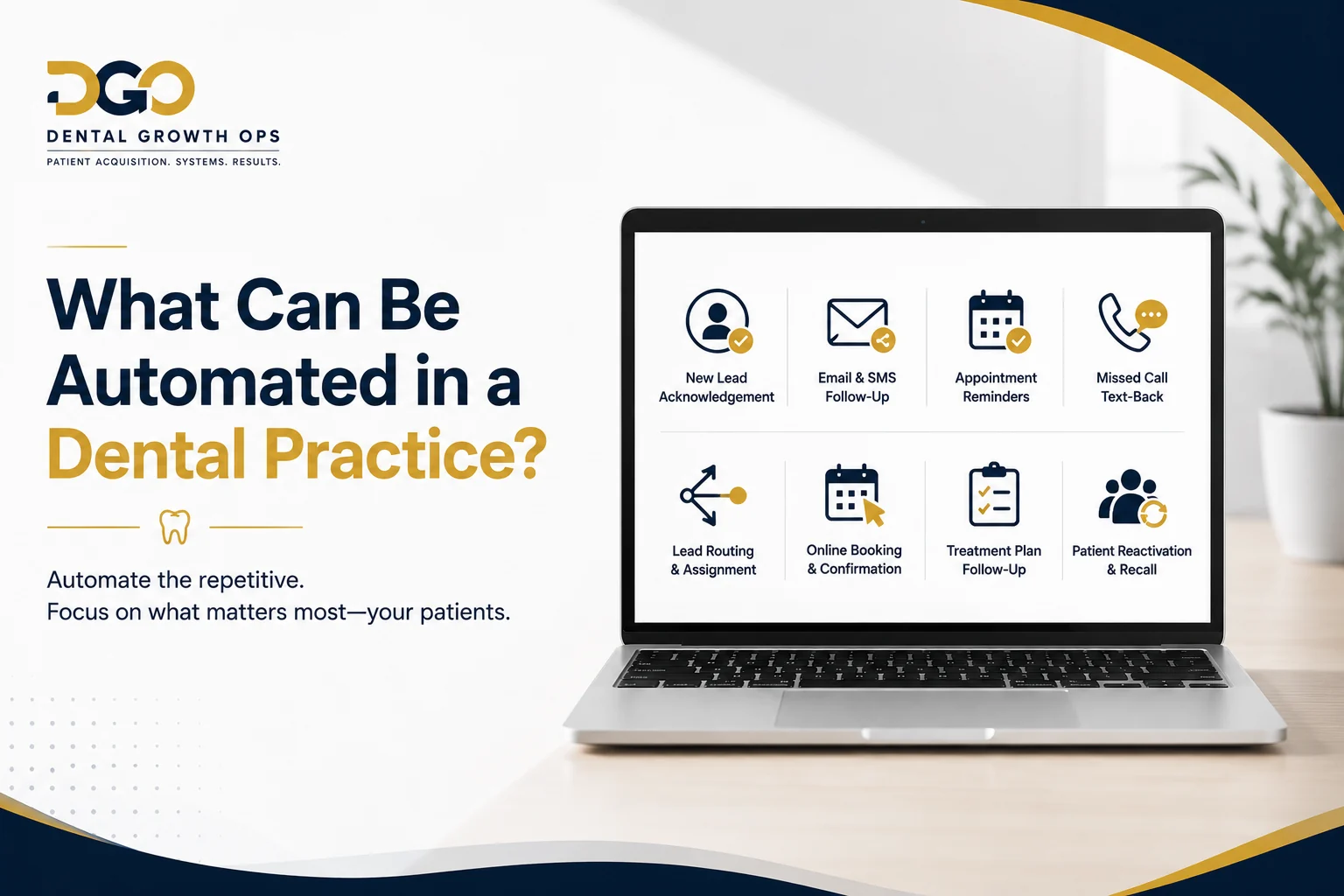
- New lead acknowledgement. An immediate SMS and email to any new enquiry, within seconds rather than hours.
- Missed-call text-back. An automatic text to any unanswered inbound call, with a booking link and an invitation to reply.
- Website form response. A tailored reply based on which form and which treatment the patient asked about.
- Lead routing. Assignment by treatment type, location, provider or availability, so the right person picks it up.
- Appointment booking. Self-service booking against real availability, from a link in a message or on the website.
- Appointment confirmation. Immediate confirmation with time, address, parking, paperwork and what to bring.
- Reminders. Timed SMS and email reminders before the appointment, with a one-tap confirm or reschedule.
- No-show recovery. A same-day sequence when a patient does not attend, plus a task for a call.
- Lead nurture. Multi-step email and SMS for enquiries that did not book on first contact.
- Treatment plan follow-up. Sequences for treatment presented and not yet accepted, segmented by treatment and value.
- Dormant patient reactivation. Segmented outreach to patients who have not attended in 12, 18 or 24 months.
- Review requests. Triggered after an attended appointment, once, with no repeat if the patient already reviewed.
- Staff task creation. Tasks with a due time and a named owner, generated by the system rather than by memory.
- Pipeline updates. Stage movement triggered by real events: contacted, booked, attended, presented, accepted.
- Lead source tracking. Source captured at the moment of entry and carried through every subsequent stage.
- Follow-up reporting. Response times, contact rates, booking rates and outcomes by source, produced automatically.
What should not be fully automated
This list matters more than the one above, because getting it wrong damages trust in a way no campaign recovers.
- Clinical advice. Never. Symptoms, medication, post-operative concerns and anything a patient might act on clinically go to a person.
- Treatment recommendations. A message can explain what a treatment is. Only a clinician recommends one.
- Sensitive patient conversations. Anxiety, pain, bereavement, anything the patient has flagged as difficult.
- Complaints. An automated reply to a complaint escalates it. Route complaints to a human immediately and stop every other sequence.
- Complex financial conversations. Financing, insurance edge cases and payment plans need a person who can answer a follow-up question.
- High-value treatment closing. Full-arch, implant and large cosmetic cases are won in conversation. Automation gets the conversation booked; it does not hold it.
Professional guidance on patient communication from the American Dental Association and, for Canadian practices, the Canadian Dental Association is the right reference point for where the clinical line sits in your jurisdiction.
The 7 Most Important Dental Marketing Automations
If a practice built only these seven, it would recover more opportunities than most do with a full platform and no design. They are ordered by return, not by difficulty.
Dental CRM automation workflows
- LeadForm, call, ad, chat or message
- CRMContact created, source tagged, owner assigned
- Email / SMSInstant reply, then a sequence with exit conditions
- BookingCalendar, confirmation, reminders, reschedule
- PipelineStage, value, outcome, source reporting
1. New patient speed-to-lead
The workflow that pays for the whole system. Its only job is to make sure no new enquiry waits.
- Trigger: a website form submission, a Google Ads lead form, a Meta lead form, a chat conversation or an inbound message.
- CRM record: a contact is created or matched, tagged with source, campaign, treatment interest and location.
- Immediate acknowledgement: an SMS within seconds that names the practice, references what they asked about and tells them what happens next. An email follows with more detail.
- Staff notification: the assigned owner is notified, with the enquiry detail, not just "new lead".
- Booking link: included in the first message, so a ready patient can book without waiting for anyone.
- Follow-up sequence: a defined series of touches over the following days, mixing SMS, email and staff call tasks.
- Stop conditions: the sequence ends the moment the patient books, replies, or asks to stop. This is not optional. A sequence that keeps messaging a booked patient reads as incompetence.
If the practice's website is not capturing enquiries cleanly in the first place, this workflow has less to work with. Our guide to dental website conversion mistakes covers the capture side, and we build the sites themselves as dental website development.
2. Missed-call text-back
In most practices this recovers more enquiries than any campaign change, and it is the fastest workflow to deploy.
- The call rings out, goes to voicemail, or comes in outside hours.
- A contact is created or updated in the CRM, so the call now exists as a record.
- An SMS goes out automatically: the practice missed them, here is a booking link, or reply here and someone will call back.
- A callback task is created for a named person with a due time.
- The opportunity enters the pipeline as a tracked enquiry rather than a lost ring.
The reason this works is simple: the patient was holding their phone. A text arriving 30 seconds later gets read. A callback two hours later competes with whoever answered in the meantime.
3. Long-term lead nurture
Built for the patient who is interested and not ready. That describes most implant, clear aligner and cosmetic enquiries.
- Email carries the longer material: what the treatment involves, how long it takes, what recovery looks like, what it typically depends on, what financing exists.
- SMS carries the short prompts: a question, a booking link, a check-in.
- Educational content answers the questions this treatment always raises, in plain language, without pressure.
- Financing discussion prompts invite a conversation rather than quoting a number in a message.
- Booking links appear in every touch, because readiness arrives without warning.
- Cadence starts close together and spaces out. Weeks, then months. A patient who enquired about implants in March may book in September, and the practice they remember is the one that stayed useful rather than the one that stayed loud.
4. Appointment confirmation and reminders
The least glamorous workflow and one of the most valuable, because it protects capacity you have already paid to fill.
- Confirmation immediately on booking: time, date, address, parking, what to bring, who they will see.
- Reminders at defined intervals before the appointment, with a one-tap confirm.
- Rescheduling handled by link rather than by phone tag, which recovers appointments that would otherwise become no-shows.
- Calendar synchronisation so availability shown to patients matches reality and double bookings do not happen.
- Staff visibility of who has confirmed and who has not, so the front desk calls the right five people rather than all forty.
5. No-show recovery
A no-show is not a lost patient unless the practice treats it as one.
- Same-day follow-up that is warm, not punitive. The patient's day went wrong; the message should make rebooking easy.
- Rescheduling link in the first message.
- Follow-up task for a call if there is no response, assigned to a person with a due time.
- Nurture fallback if the patient does not respond at all, so they re-enter a slower sequence instead of being deleted.
6. Treatment plan follow-up
Treatment presented does not mean treatment accepted. The gap between those two numbers is the largest recoverable value in most practices, and almost nobody works it systematically.
- Trigger: a treatment plan is presented and not accepted at the appointment.
- Timing: the first follow-up while the consultation is still fresh, then spaced touches over the following weeks, tuned to treatment value. A $600 plan and a $30,000 plan do not deserve the same cadence.
- SMS for the short check-in and the offer of a call.
- Email for the plan summary, financing information and answers to the objections this treatment always raises.
- Staff tasks for the treatment coordinator, because a high-value case is closed in conversation.
- Exit conditions: accepted, declined explicitly, or moved to long-term nurture. Never left running silently.
- Pipeline movement: the opportunity moves stage on a real event, so the presented-but-not-accepted list is always current and always visible.
7. Patient reactivation and reviews
The cheapest production in an established practice is already in the database.
- Dormant patient lists segmented by last visit: 12, 18 and 24 months, treated differently rather than blasted identically.
- Recall for patients overdue for a routine visit, with easy rebooking.
- Hygiene reactivation as its own segment, because it fills chair time that would otherwise sit empty.
- Incomplete treatment as another segment: patients who started something and stopped.
- Review requests triggered once after an attended appointment, suppressed for anyone who has already reviewed, and never incentivised. Our approach is covered on the dental reputation management page and in more depth in review velocity for dental practices.
- Segmentation throughout, because a message that reads as though it knows who you are gets a reply, and a mass send gets an unsubscribe.
What a Tracked Dental Pipeline Actually Shows
To make this concrete rather than theoretical: our own reference CRM build tracked $115,600 in treatment presented, $40,100 accepted, 28 tracked opportunities and a 25% pipeline conversion rate through one visible pipeline.
Read that correctly. It is not a claim that the CRM generated $115,600. Clinicians, treatment coordinators and the marketing that produced those enquiries generated it. What the system did was make all of it visible and attributable, and that is the part practices are missing.
Here is what those four numbers prove:
- Opportunity visibility. Twenty-eight enquiries existed as records, not as recollections. Nothing sat unnoticed in an inbox.
- Pipeline tracking. Each one had a stage, so at any moment you could answer where every opportunity stood.
- Treatment value tracking. Presented value was recorded, which is what makes prioritisation possible. A practice that does not know which open opportunities are worth $30,000 cannot follow up intelligently.
- Follow-up ownership. Every stage had a named owner and a next action with a due time.
- Outcome reporting. Accepted versus presented, as a conversion rate, by stage. That is the number a spreadsheet and an inbox cannot produce.
The general point: you cannot improve a conversion rate you cannot see. Most practices do not have a follow-up problem they have chosen to ignore, they have a follow-up problem they cannot observe.
How many dental leads are sitting inside your inbox without a next step?
Dental Growth Ops connects your lead sources, CRM, email, SMS, booking and follow-up into one measurable patient conversion system. See how we build dental CRM automation, then book a call and we will map your five stages.
Book a Marketing Automation AuditWhat Is a Dental CRM?
A dental CRM is a system that holds every patient enquiry and every patient relationship on the marketing side of the practice: where the enquiry came from, what was said, what stage it is at, what it is worth, who owns it and what happens next.
The clearest way to think about it is positionally. The CRM sits between your marketing channels and your practice operations. Channels feed it. It feeds the schedule.
Practice management software
Your practice management system is the clinical and administrative core of the practice. It is used primarily for clinical records and charting, scheduling, treatment planning, insurance and billing, and patient administration. It is very good at running the journey of a patient who is already a patient.
What it was never designed to do is manage a person who is not yet a patient. It has no concept of a lead that has not booked, no follow-up sequence for someone who enquired and went quiet, and no attribution back to the ad that produced the call.
Marketing CRM
The marketing CRM handles everything before the first appointment and much of what happens between visits: lead capture from every channel, automated and manual follow-up, pipeline stages, attribution, patient communication by email and SMS, nurture, reactivation and reporting.
| Dimension | Practice management software | Marketing CRM |
|---|---|---|
| Primary user | Clinical team, front desk, billing | Front desk, treatment coordinator, marketing, ownership |
| Holds | Existing patients and their clinical records | Enquiries, leads and patient relationships |
| Time span | First appointment onward | First contact onward, including people who never book |
| Strength | Charting, scheduling, treatment plans, insurance, billing | Capture, follow-up, pipeline, nurture, attribution, reporting |
| Automation | Reminders and recall, usually limited to booked patients | Trigger-based workflows across every stage and channel |
| Attribution | None. It never saw the ad, the form or the missed call | Source captured at entry and carried to outcome |
| Answers the question | What treatment does this patient need and what do we bill? | How many enquiries did we get, what happened to them, and which channel produced them? |
In almost every practice, the CRM complements the practice management system rather than replacing it. Ripping out a clinical system is a large, risky project with no marketing upside. Adding the layer that handles everything before and around it is a much smaller project with a clear one.
GoHighLevel for Dental Clinics
We build on GoHighLevel, so it is worth being specific about what it does and equally specific about what it does not.
GoHighLevel is a CRM and marketing automation platform. The components a dental build actually uses:
- Contact database with custom fields for treatment interest, source, location, provider and referral origin.
- Pipelines and opportunities with stages, monetary values and owners, which is what turns follow-up into something reportable.
- Opportunity values so treatment presented and accepted can be tracked in money rather than in counts.
- Calendars for consultations and appointment types, with availability rules per provider.
- Forms and survey logic for website enquiries, with treatment routing built into the questions.
- Landing pages for campaign-specific traffic where a dedicated page converts better than a general site page.
- SMS and email as first-class channels, sent from workflows rather than by hand.
- Workflows with triggers, conditions, waits, branches and exit rules. This is where the actual system lives.
- Tasks assigned to named users with due dates, so human steps are tracked as rigorously as automated ones.
- Conversations as a unified inbox across SMS, email, and connected social and chat channels.
- Reporting on pipeline stages, opportunity values, conversion rates and communication activity.
- Lead source attribution captured at entry and preserved on the contact and the opportunity.
- Integrations with calendars, phone systems, ad platforms and web forms.
Now the important part. GoHighLevel out of the box is not a finished dental system. It is a capable, general-purpose platform with an empty pipeline, no workflows, no treatment segmentation, no dental copy and no idea what a treatment coordinator does. Buying it and switching it on produces a subscription, not a system.
The value comes entirely from configuration against the real patient journey: which enquiry types exist in this practice, which treatments need which cadence, who owns which stage, what the exit conditions are, and how a case moves from presented to accepted. Two practices on the same platform can have completely different results because one has an architecture and the other has an account.
We are not a GoHighLevel affiliate and this is not a platform recommendation article. Other platforms can do much of this. We use GoHighLevel because it combines the pieces we need in one place under a white-label build, which keeps the number of moving parts low. The framework in this article applies whatever platform you choose.
What a Dental CRM Pipeline Should Look Like
A pipeline is the spine of the system. Get it wrong and every report downstream is misleading. The stages below are a practical starting point for a general practice with consultation-led treatment.
- New inquiry. Captured, source tagged, not yet contacted. Time in this stage is your speed-to-lead metric.
- Contacted. A real two-way contact has happened, not just an automated message sent.
- Consultation requested. The patient has expressed intent to come in but has no date yet.
- Consultation booked. A date exists on a calendar.
- Consultation attended. They showed up. The gap between this stage and the one above it is your show rate.
- Treatment plan presented. A plan exists, with a value attached to the opportunity.
- Follow-up. Presented and not yet decided. This is the stage practices most often skip, and it is where the recoverable money sits.
- Accepted or won. Treatment agreed, with the accepted value recorded.
- Lost or nurture. Declined, unresponsive or not now. Nurture, not deletion, for anything that was not an explicit no.
Three rules for pipeline design, learned the hard way.
Stages must match the real practice process. If your practice presents treatment at the first visit, do not build a pipeline that assumes a separate consultation. A pipeline that describes an imaginary process gets ignored within a fortnight, and an ignored pipeline produces confidently wrong reports.
Every stage needs a definition and an owner. "Contacted" has to mean one specific thing that two different staff members would judge identically. Otherwise your conversion rates measure interpretation, not performance.
Stages should move on events, not on opinion. Booking moves the stage. Attendance moves the stage. Presenting a plan moves the stage. Manual dragging is for exceptions, not for the normal path.
Practices running several distinct treatment lines, implants and orthodontics for example, usually need more than one pipeline. The cadence, values and stage names are genuinely different, and forcing both through one pipeline produces averages nobody can act on.
How Dental Lead Sources Connect to Automation
Every channel needs a defined path into the CRM, a defined automated response and a defined human action. If any column is blank for a channel, that channel leaks.
| Lead source | CRM action | Automated response | Human action |
|---|---|---|---|
| Website form | Contact created, treatment and page source tagged, opportunity opened at New inquiry | Instant SMS plus confirmation email with booking link | Call within the agreed response window |
| Answered phone call | Call logged against contact, source recorded from tracking number | Follow-up SMS if not booked on the call | Book on the call, or set the next action before hanging up |
| Missed call | Contact created or updated, opportunity opened, callback task created | Missed-call text-back with booking link | Callback by the named owner, same day |
| Google Ads | Campaign, ad group and keyword-level source stored on the contact | Treatment-specific instant reply matching the ad | Priority call, since the click was paid for |
| Meta lead form | Lead pulled into CRM, tagged by campaign and creative | Immediate SMS, because Meta leads cool fastest | Call plus a qualifying question set, intent is lower here |
| Live chat | Transcript attached to contact, treatment interest tagged | Continuation by SMS so the thread survives the page close | Human takeover on any clinical or complex question |
| Social message | Conversation surfaced in the unified inbox, contact created | Acknowledgement and a request for the best number | Reply in channel, then move to phone or SMS |
| Patient referral | Contact created with referrer recorded on the record | Warm acknowledgement that names the referrer | Personal call, and a thank you to the referring patient |
Two notes on the paid channels. Google Ads leads carry high intent and deserve the fastest human response, which is one reason we treat CRM connection as part of campaign setup rather than an afterthought: see Google Ads for dentists and what a $5K monthly Google Ads budget buys. Meta leads carry lower intent and higher volume, so follow-up quality decides the outcome entirely: see Facebook Ads for dental clinics and our Meta Ads guide. If you advertise cosmetic or elective treatment, Meta's health and wellness advertising standards govern what the ads and forms can say.
Email and SMS Automation for Dental Clinics
Most practices pick one channel and use it for everything. The two do different jobs, and a good sequence uses both deliberately.
What SMS is good at
- Immediate acknowledgement. Read within minutes, which is the entire point of speed to lead.
- Appointment reminders and confirmations. One tap to confirm, one tap to reschedule.
- Short follow-up. One question, one link, no preamble.
- Booking links. The shortest path from intention to a slot on the calendar.
SMS is also intrusive, which is exactly why it works and exactly why it must be rationed. Two well-timed texts convert. Six read as harassment and produce opt-outs you cannot undo.
What email is good at
- Longer educational content. What the treatment involves, stages, timelines, aftercare.
- Treatment information that a patient wants to reread, or show to a partner before deciding.
- Financing information that needs more than a sentence.
- Multi-step nurture over weeks and months, where SMS would wear out fast.
- Reactivation to a dormant list, where email is cheaper and lower risk than texting hundreds of people.
Consent, opt-out and volume
Automated messaging is governed by consent rules that vary by country, state and province, and the rules for marketing messages differ from the rules for transactional ones such as an appointment reminder. Practical operating principles that hold regardless of jurisdiction:
- Collect consent explicitly at the point of capture, and record when and how it was given.
- Keep marketing messages and transactional messages separate, with separate opt-outs.
- Honour an opt-out immediately and across every sequence, not just the one they replied to.
- Send from an identifiable practice name, never an unattributed number.
- Respect quiet hours and time zones. A 6am text about a treatment plan costs you the patient.
- Keep patient clinical detail out of automated messages. A message says "about your consultation", not what was found.
- Cap total contact frequency across all workflows, so a patient in three sequences does not receive nine messages in a week.
We build systems with these controls in place, and we do not offer legal advice or claim that any configuration makes a practice automatically compliant with HIPAA, PIPEDA or messaging regulations. Get your consent language and your data handling reviewed by someone qualified in your jurisdiction. That review is cheap relative to getting it wrong.
Dental Marketing Automation vs Regular Email Marketing
This distinction matters because a lot of practices believe they already have marketing automation. What they usually have is a newsletter tool.
| Dimension | Regular email marketing | Marketing automation |
|---|---|---|
| What starts a send | A person decides to send a campaign | A trigger: an enquiry, a missed call, a booking, a no-show, a presented plan |
| Audience | The same message to a broad list | Patient-stage aware, segmented by treatment, value and behaviour |
| Channels | Email only, usually | Email, SMS, calls and tasks in one sequence |
| Logic | Limited. Opens and clicks at best | Branching on behaviour, stage, treatment and reply |
| Connection to CRM | A list, not a pipeline | Native. The contact, the opportunity and the messages are one record |
| Stopping | Unsubscribe, or the campaign ends | Exit conditions on real actions: booked, replied, accepted, declined |
| Human involvement | None, by design | Creates staff tasks at the points where a person converts better |
| Reporting | Opens, clicks, unsubscribes | Opportunity stages, booking rate, treatment presented and accepted by source |
A newsletter is not useless. It is just not the system. If a practice sends a monthly email and calls that marketing automation, the entire follow-up layer is still missing.
What Should Stay Human?
The most common objection we hear is that automation will make the practice feel like a call centre. That objection is correct about badly designed systems, and it is worth taking seriously.
The design principle we work to:
Automation should decide what needs attention. Your team should handle the conversations that require judgment.
In practice, that means the system does the watching, the timing, the record keeping and the first acknowledgement, and people do the following:
- Complex treatment conversations. Anything where the patient's next question cannot be predicted.
- Objections. Cost, fear, timing, a second opinion. These are conversations, not message sequences.
- Financing. Options, eligibility, what the monthly figure actually means for this patient.
- Clinical questions. Always, without exception, and the system should be built to escalate them fast.
- Complaints. A human replies, and every automated sequence for that contact stops immediately.
- High-value follow-up. A $30,000 case gets a named person and a phone call, not a fourth email.
- Personalised calls. Long-standing patients, referrals from patients, anyone the practice knows well.
- Sensitive conversations. Anxiety, bereavement, anything the patient has told you is difficult.
A well-built system produces fewer, better human conversations. The front desk stops spending its day on message triage and spends it on the calls that decide cases. That is the actual argument for automation in a dental practice, and it is a staffing argument as much as a marketing one.
What Should Dental Clinics Track?
The chain to instrument runs enquiry, contacted, booked, attended, presented, accepted, with the source carried the whole way. Break it anywhere and every number after the break becomes an opinion.
| Metric | What it tells you |
|---|---|
| New enquiries | Demand reaching the practice. The first honest signal that a channel works at all |
| Contact rate | Follow-up effectiveness. A low rate is a process problem, not a traffic problem |
| Response time | Whether speed to lead is real or aspirational. Measure it, do not assume it |
| Booking rate | Lead quality and conversion together. Falls when targeting is loose or the offer is unclear |
| Show rate | Whether confirmations and reminders are doing their job |
| No-show rate | Lost chair time, and whether recovery workflows are recovering anything |
| Lead source | Which channel produced which outcome. Without this, budgeting is guesswork |
| Cost per booked patient | Acquisition efficiency, and the only fair way to compare one channel with another |
| Treatment presented | Opportunity value. Shows whether marketing attracts the cases you want |
| Treatment accepted | Commercial outcome. The figure that connects spend to production |
| Reactivated patients | Production recovered from the database rather than bought |
| Reviews generated | Whether the review workflow runs consistently or in bursts |
Two cautions. First, we deliberately publish no benchmark targets for these metrics. Any figure would depend on your treatment mix, market, price point and capacity, and quoting a national average would give you a number to feel good or bad about rather than something to act on. Your own baseline in month one is the benchmark that matters.
Second, review these monthly, one line per source, and change one thing at a time. If you are sizing the budget behind all this, how much a dental practice should spend on marketing works the figure backward from patient targets instead of a flat percentage of revenue.
The 14-Day Dental Marketing Automation Build
This is our implementation target for an agreed scope, and it exists because open-ended automation projects tend never to launch. Two weeks is enough to build a working system for a single-location practice with standard channels. It is not a promise that every possible dental tech stack can be integrated in that window: unusual practice management systems, phone platforms, multi-location data migrations and bespoke integrations can extend it, and we say so before starting rather than after.
Days 1 to 2: automation audit
We map what exists. Every lead source and where it currently lands, current response times measured rather than estimated, the real patient journey as staff describe it, treatment priorities, who owns what, and what the practice management system and phone platform can and cannot do. Deliverable: a documented current state and a written scope, including anything we have concluded cannot be integrated.
Days 3 to 5: CRM architecture
Pipelines and stage definitions, custom fields, treatment segmentation, user accounts and permissions, calendars and availability rules, task ownership, and the source-tracking scheme that everything downstream depends on. Deliverable: a configured CRM with a pipeline that matches the real process, ready for workflows.
Days 6 to 9: workflow build
The workflows themselves, with copy written for this practice: speed to lead, missed-call text-back, nurture by treatment, confirmations and reminders, no-show recovery, treatment plan follow-up, reactivation and review requests. Every sequence gets triggers, timing, branches, staff tasks and explicit exit conditions. Deliverable: the seven core workflows built and documented.
Days 10 to 11: channel integrations
Website forms, call tracking and the phone system, Google Ads, Meta lead forms, chat, connected social inboxes, calendar synchronisation, and reporting connections. Deliverable: every agreed lead source flowing into the CRM with its source intact.
Days 12 to 13: testing
End to end, with real submissions and real calls. Every trigger fired, every message checked on a phone, every exit condition confirmed, every task landing with the right person, no duplicate sends, no sequence running past a booking. Deliverable: a test log showing each workflow verified, plus fixes applied.
Day 14: team handoff and launch
Training with the people who will use it daily, written documentation of every workflow, the reporting view, escalation rules for clinical questions and complaints, and named ownership for each pipeline stage. Deliverable: a live system the team can run, plus documentation they own.
What we guarantee is the implementation: CRM live, agreed lead sources connected, workflows tested end to end, messages sending, pipeline movements working, booking flow working, reporting active and the team trained. What we do not guarantee, and nobody honestly can, is a number of new patients, leads, rankings or a revenue figure. Those depend on your market, your capacity, your pricing and your clinical team.
What Does Dental Marketing Automation Cost?
We are not going to invent industry pricing, and you should be sceptical of any article that does. What we can do is tell you exactly what the cost depends on, so you can evaluate a quote properly.
What moves the number:
- Number of locations. Each location adds pipelines, calendars, routing rules and reporting views.
- Existing systems. A common practice management system and a modern phone platform are straightforward. An unusual or on-premise system can add significant work or rule integration out.
- Workflow complexity. Four workflows for one treatment is a different project from fifteen across implants, orthodontics and hygiene.
- Lead volume. Affects messaging costs and, above a certain point, the phone and number configuration required.
- Phone and SMS requirements. Numbers, call tracking, recording, and per-message costs, which are usage-based and separate from any build fee.
- Integrations. Each connected platform is scope. Some are trivial, some need custom work, some are not possible.
- Data migration. Importing and deduplicating an existing patient database is often the single largest variable, and dirty data is common.
- Reporting. Standard pipeline reporting versus custom dashboards by location, provider or treatment line.
- Support model. Whether the practice runs the system after handoff or we manage and optimise it monthly.
Three separate cost layers, which providers sometimes blur together deliberately:
- Software cost. The platform subscription, plus usage-based SMS, email and phone charges. Ongoing, and it should be transparent to you.
- Setup and implementation. A one-off project cost: architecture, workflow build, integrations, testing, documentation and training. This is where the actual value is created, and where cheap quotes usually cut.
- Ongoing management. Optional and recurring: monitoring, workflow optimisation, copy changes, reporting and support. Some practices take this on internally after handoff, which is a legitimate choice if someone owns it.
Ask any provider to quote those three layers separately. If they cannot, or will not, you are looking at a bundled monthly figure that makes it impossible to know what you are paying for or what happens if you leave. How we structure engagements is set out on our dental marketing pricing page.
When Is a Dental Clinic Ready for Marketing Automation?
Not every practice should do this now, and we turn down work on this basis. Automation improves a working patient acquisition system. It does not manufacture demand from nothing.
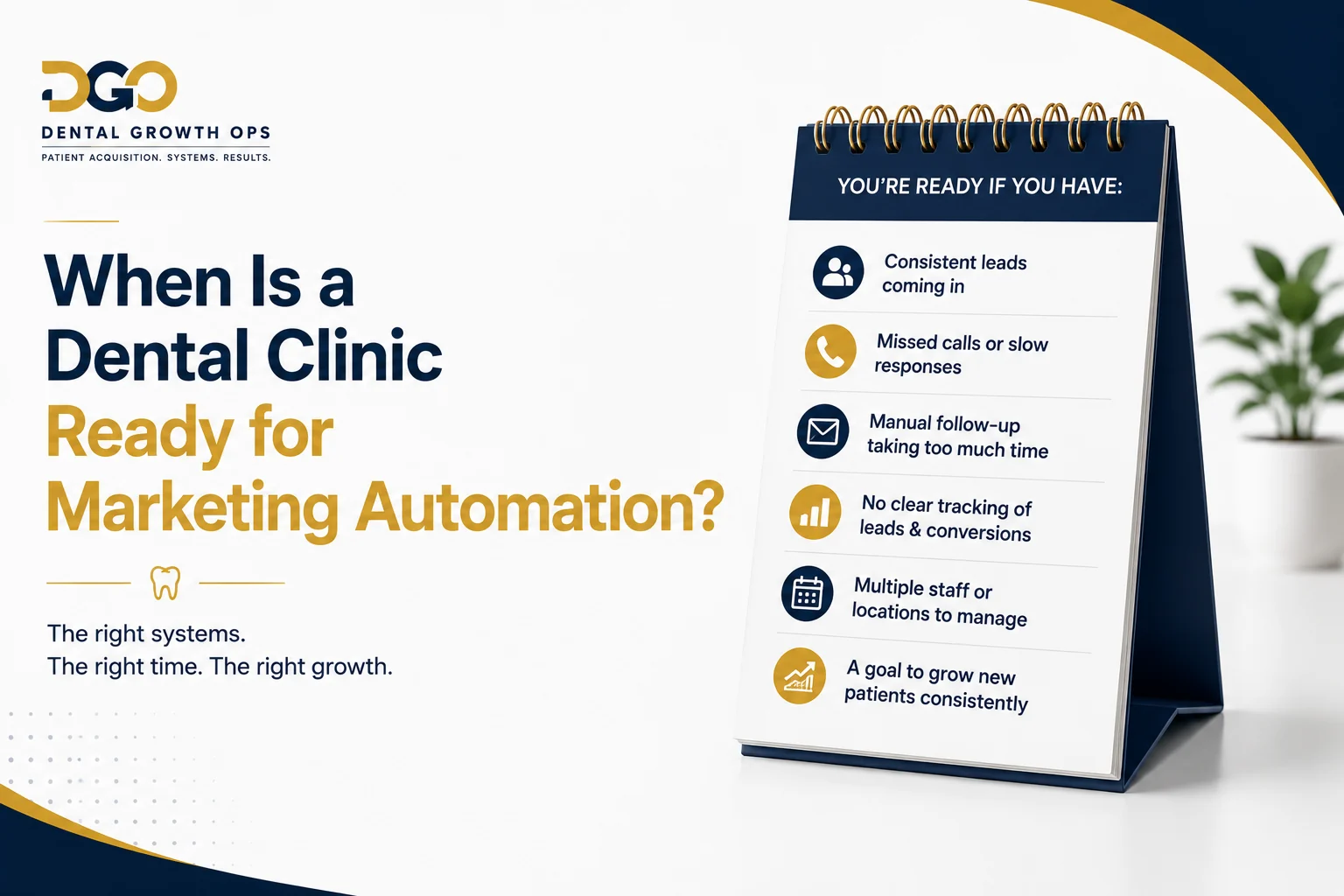
Good fit
- Roughly 30 or more enquiries a month across all channels, enough volume for workflows to matter and for data to mean something
- More than one lead source, so centralising actually solves a problem
- Active advertising, where slow follow-up is currently wasting paid clicks
- Missed calls happening regularly, which is nearly every practice
- Follow-up currently manual, inconsistent or dependent on one person
- Several staff members involved, so ownership and tasks need to be explicit
- Treatment plans that require follow-up, which means any practice doing implants, orthodontics or cosmetic work
- An existing patient database with dormant patients in it
- A genuine need to know which channel produced which patient
Not ready yet
- No lead generation at all. There is nothing for the system to process, and automation will not create enquiries
- No staff ownership available. Every workflow has human steps, and without an owner they fail silently
- No capacity for new patients. Filling a pipeline you cannot serve damages your reputation faster than any marketing builds it
- Unable or unwilling to provide system access. We cannot connect what we cannot reach
- No marketing activity of any kind. Start with visibility: the website, dental SEO, then paid channels. Come back to automation when there is a flow to manage
If you are in the second list, the honest sequence is demand first, then the system that converts it. Our dental marketing strategies guide covers that side channel by channel.
Common Dental Marketing Automation Mistakes
Roughly in order of what they cost.
- Automating before mapping the patient journey. Workflows built on an imagined process automate the wrong thing efficiently.
- Sending too many messages. The fastest way to burn a patient list. More touches is not more follow-up.
- Not defining exit conditions. A patient who booked on Tuesday receiving "still thinking about it?" on Thursday tells them nobody is paying attention.
- No human handoff. The system generates interest and then has nowhere to put it. Every workflow needs a point where a person takes over.
- No pipeline. Automation without stages produces activity you cannot report on.
- No staff ownership. Unassigned tasks are not tasks. Every stage needs a name against it.
- No lead source attribution. The single most expensive omission, because it makes every budget decision a guess forever.
- Building workflows nobody monitors. Sequences break. A phone integration changes, a form field is renamed, and messages silently stop. Somebody has to look.
- Using generic templates. Copy written for gyms and roofers reads exactly like copy written for gyms and roofers.
- Treating every treatment the same. A hygiene enquiry and a full-arch enquiry need different cadence, different content and different ownership.
- No testing. Untested workflows fail in front of patients, which is the most expensive place to find a bug.
- No reporting. If nobody reviews the numbers monthly, the system stops improving the day it launches.
- Expecting software to fix weak marketing. A CRM converts demand. It does not create it. If the enquiry volume is not there, this is not the project to run first.
How Marketing Automation Connects With Dental Marketing
Marketing automation is one half of a system. Treating it as the whole thing is a mistake, and so is treating lead generation as the whole thing. They fail in opposite directions.
Lead generation creates demand
Local SEO and the Google Business Profile capture demand that already exists near the practice. Google Ads buys high-intent visibility immediately. Meta Ads create awareness for elective treatment nobody searches for on an ordinary day. The website converts attention into an enquiry. Social media and patient referrals build familiarity and trust before anyone searches at all.
Marketing automation converts and manages demand
The CRM, SMS, email, booking, follow-up, pipeline and reporting take that enquiry and carry it to an attended appointment, a presented plan and an accepted case. Then they keep the relationship alive for recall, reactivation and reviews.
Lead Generation → CRM → Follow-Up → Booking → Treatment → Reporting
Why both halves matter, stated plainly: a practice with excellent lead generation and no automation pays full price for enquiries it then loses, and the fix looks like "we need more leads" when it is not. A practice with excellent automation and no lead generation has built a beautifully instrumented system with almost nothing flowing through it. The second failure is less common and just as wasteful.
The order we recommend, when a practice is starting from scratch: get capture working (website and phone), get visibility running (SEO, then paid if there is capacity), then build the automation layer before the volume arrives rather than after. Practices that wait until they are overwhelmed build the system in a hurry, and it shows. Our services overview shows how the pieces fit together, and the Dallas guide works the same logic through a specific local market.
Marketing Automation for Multi-Location Dental Clinics
Multi-location groups and DSOs get more from automation than single sites, and they also get more ways to build it badly. The extra requirements are structural, not cosmetic.
- Location-specific pipelines. Each site needs its own pipeline, or at minimum its own view, so a practice manager sees their own opportunities and not everyone's.
- Lead routing. Enquiries route by the location the patient chose, the geography they came from, or the treatment they asked about. Getting this wrong sends patients to the wrong site and shows in the show rate.
- Shared reporting. Group-level reporting that rolls up every location, alongside per-location detail. Ownership needs both views, and they must reconcile.
- Separate calendars. Per location and per provider, with availability rules that reflect real rotas rather than a group default.
- Different providers. Not every site offers every treatment. Routing has to know that, or you book implant consultations at a location with no implant provider.
- Centralised follow-up standards. One definition of "contacted", one response-time standard, one message tone, applied everywhere. This is the main advantage of a group: the best site's process becomes the group's process.
- Location attribution. Source plus location on every enquiry, so you can see that one site's paid search works and another's does not.
- Management visibility. A single view that answers which locations are following up well and which are not, without asking anyone.
A single CRM across several locations is normally the right answer, with permissions separating what each team sees. The mistake we see most often is one CRM with no separation, where every manager sees every enquiry, nobody feels ownership, and the group's response times get worse than they were before.
How to Choose a Dental Marketing Automation Provider
Use this as a checklist in the conversation. It is not about us; it is about whether the person quoting has built one of these before.
- Can they map the patient journey? Ask them to describe your journey back to you after one conversation. If they cannot, they will build from a template.
- Can they build custom pipelines? Or do they install a standard pipeline that every client gets?
- Can they connect your actual lead sources? Name each one and ask specifically. "We integrate with everything" is not an answer.
- Can they configure SMS and email properly? Sending domains, numbers, deliverability, consent capture, opt-out handling.
- Do they set exit conditions? Ask how a sequence stops when a patient books. If this question surprises them, walk away.
- Do they assign human tasks? A system with no human steps is a message blaster.
- Can they handle attribution? Ask how the source of a phone call reaches the pipeline, specifically.
- Do they document workflows? You need a written record of what runs, when and why, that survives their involvement.
- Do they train your staff? The front desk has to use this daily. Training is not a PDF.
- Do they test end to end? Ask to see a test log from a previous build.
- Do you own your data and accounts? Non-negotiable. Your CRM, your contacts, your ad accounts, exportable, in your name.
- Do they understand dental? Treatment coordinators, case acceptance, recall, hygiene, no-shows, presented versus accepted. If you have to explain those, you are paying them to learn.
One more test: ask what they will not do or cannot integrate. A provider who says yes to everything has not thought about it. Our case studies and how we work pages are where we answer these questions about ourselves.
How Dental Growth Ops Builds Dental Marketing Automation
We are a dental-only team, not a generalist agency with a dental page. Marketing automation is one of our core builds, and we connect it to the channels that feed it: the website, local SEO, Google Ads, Meta Ads, inbound and missed calls, forms, a white-labelled GoHighLevel CRM, email, SMS, calendars, follow-up workflows and reporting, as one system rather than a set of separate invoices.
The positioning is simple: we build the system between the lead and the booked patient.
Our reference system tracks $115,600 in treatment presented, $40,100 accepted and 28 opportunities inside one visible dental pipeline. That is evidence of what a properly instrumented pipeline makes visible and attributable, not a claim about revenue the software produced on its own.
What we guarantee is the implementation, never the market: CRM live, lead sources connected, workflows tested end to end, messages sending, pipeline movements working, booking flow working, reporting active, team trained. We do not promise rankings, a number of new patients, or a revenue figure, and we tell you before we start what we do not think we can integrate. You can see the service in detail on our dental CRM automation page.
Where to Start
If you take one thing from this guide, take the distinction: lead generation and lead conversion are two different systems, and most practices have funded only the first.
Start by finding out what actually happens now. Submit your own website form and time the response. Call your own practice at 4:50pm on a Friday and see what happens. Count how many enquiries you received last month and how many you can account for. That exercise takes an afternoon and usually tells an owner more than a quarter of reporting.
Then build in this order: capture every source into one place, respond immediately, follow up in a defined sequence with exit conditions, book and remind properly, and track through to treatment accepted. Do not build fifteen workflows. Build the speed-to-lead sequence and missed-call text-back first, because they are the fastest to deploy and the most likely to pay for the rest.
If you would like a second opinion on where your practice is losing opportunities, get in touch and we will walk through your lead sources, your follow-up and your numbers with you.
Moaz Arshad
Founder of Dental Growth Ops. Dental-only marketing specialist focused on new patient acquisition, CRM automation, and paid media for dental clinics in the US and Canada.
More about us →